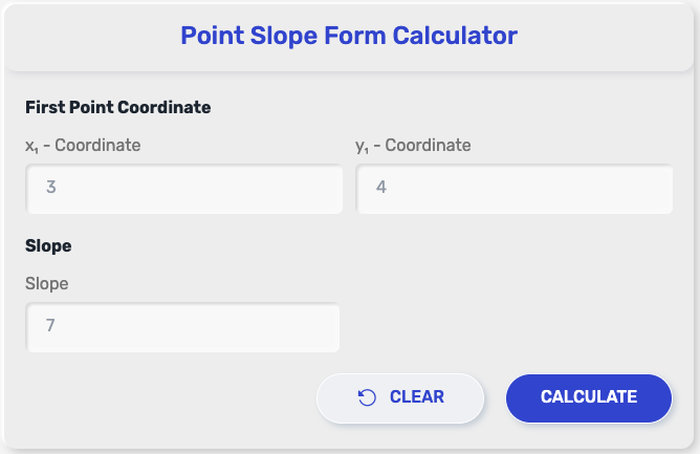
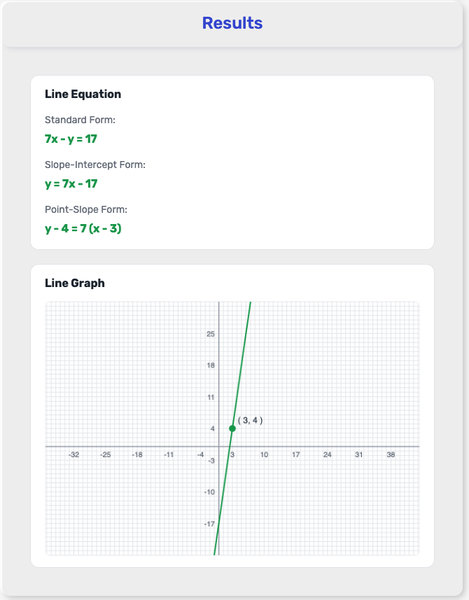
This point slope form calculator lets you quickly write the equation of a line using a point and slope. Enter your values, get the result instantly, and convert it into standard or slope-intercept form when needed.
How to Use the Point Slope Form Calculator Step by Step
Getting your equation takes just a few quick inputs. The tool is designed so you can move from numbers to a complete line equation without extra steps or manual work.
Enter the x-coordinate of your point Start by typing the x-value of the known point on the line. This is the horizontal position.
Enter the y-coordinate of your point Add the corresponding y-value. Together with x, this forms the point (x₁, y₁) used in the equation.
Input the slope (m) Enter the slope of the line. This can be a whole number, decimal, or fraction depending on what you have.
Click the “Calculate” button Once all values are filled in, run the calculation to generate the equation.
View the result instantly The calculator will return the equation in point-slope form, ready to use or convert.
If available, you can also switch the result into slope-intercept or standard form with a single click, depending on what you need next.
What This Calculator Can Do for You
This tool is built to cover the most common tasks related to linear equations, especially when working with a known point and slope. Instead of going through multiple algebra steps, you can get results instantly and in the format you need.
Generate the equation in point-slope form Quickly form an equation like y − y₁ = m(x − x₁) based on your inputs.
Convert to slope-intercept form (y = mx + b) Useful when you need to graph the line or identify the y-intercept directly.
Convert to standard form(Ax + By = C) Ideal for certain math problems or when working with systems of equations.
Handle different types of slopes Works with positive, negative, zero, and fractional slopes without extra adjustments.
Accept flexible input formats Enter integers, decimals, or fractions depending on your data.
Work with special cases like horizontal lines When slope equals zero, the calculator returns a constant y-value equation.
Support quick verification of manual work If you’ve solved an equation by hand, you can double-check your answer instantly.
This makes the point slope form calculator useful not only for solving problems but also for checking accuracy and saving time during practice or exams.
What Your Result Means and How to Use It
After entering your values, the calculator returns an equation that represents a straight line based on the point and slope you provided.
In most cases, the result will appear in this format:
y − y₁ = m(x − x₁)
This equation shows a line that passes through the point (x₁, y₁) and follows the slope m, which describes how steep the line is.
Here’s how to interpret and use that result:
It defines a specific line on a graph The equation tells you exactly how the line behaves across the coordinate plane.
It shows how y changes relative to x The slope value indicates how much y increases or decreases when x changes.
It can be converted into other forms If needed, you can rewrite it as y = mx + b to quickly identify the y-intercept or graph the line.
It can be used in further calculations You might plug in values of x to find corresponding y values, or use it in systems of equations.
It works as a model for real situations The equation can represent patterns like speed over time, cost changes, or any linear relationship.
If the calculator provides multiple formats, keep in mind that all versions describe the same line—just written in different ways depending on your goal.
Common Situations Where This Tool Is Used
A point slope form calculator is often used when you already have key information about a line and need to turn it into an equation quickly. It fits naturally into both academic work and practical problem-solving.
Solving math exercises in school When given a slope and a point, this is usually the fastest way to write the equation of a line without extra steps.
Graphing linear equations Once the equation is generated, you can easily plot the line on a coordinate plane or graphing tool.
Working with coordinate geometry problems Many geometry tasks involve points, slopes, and lines—this tool speeds up the process.
Checking answers during exams or practice After solving by hand, you can use the calculator to confirm your result instantly.
Analyzing linear relationships in data In simple data sets where change is constant, the equation can represent trends like growth or decline.
Physics and real-world rate problems Situations involving constant speed or steady change often follow linear patterns that match this form.
Quick conversions between equation formats If you need slope-intercept or standard form, starting from point-slope makes the transition easier.
This tool is especially useful when time matters or when you want to avoid small algebra mistakes while working through multiple problems.
Point Slope Form Formula Explained Simply
The calculator is based on a standard equation used to describe a straight line when you know one point and the slope.
y − y₁ = m(x − x₁)
m is the slope of the line
(x₁, y₁) is a point that lies on the line
This format directly connects how steep the line is with a specific point it passes through.
In practice, you don’t need to manually apply this formula when using a point slope form calculator. The tool automatically places your values into the equation and returns the result instantly.
If you ever need to rewrite the equation into another format, this form acts as a starting point that can be expanded or simplified depending on your goal.
From Point-Slope Form to Slope-Intercept Form
Point-slope form is great when you already have a point and a slope. But in many cases, it’s easier to read and graph a line in slope-intercept form:
y = mx + b
That’s why converting between the two forms is a common next step after using a point slope form calculator.
Start with the standard point-slope equation:
y − y₁ = m(x − x₁)
Then expand and rearrange step by step:
Distribute m → y − y₁ = mx − mx₁
Add y₁ to both sides → y = mx − mx₁ + y₁
Now the equation is in slope-intercept form, where:
m is the slope
b = y₁ − mx₁ is the y-intercept
This also shows a useful shortcut: you can find the intercept directly using b = y₁ − mx₁ without fully expanding every time.
Quick example:
Given point (2, 5) and slope 3
y − 5 = 3(x − 2) y − 5 = 3x − 6 y = 3x − 1
Now you have a form that’s easier to graph or compare with other linear equations.
If you want to see this transformation visually, watch this quick explanation:
Common Input Mistakes to Avoid
Even though the calculator does the heavy lifting, small input mistakes can still lead to incorrect results. Paying attention to a few details can save time and avoid confusion.
Entering the wrong sign for the slope A positive slope and a negative slope create completely different lines. Double-check whether your slope should be increasing or decreasing.
Swapping x and y coordinates It’s easy to mix up (x₁, y₁). Make sure the x-value goes in the x field and the y-value goes in the y field.
Ignoring negative values in the point If your point includes negative numbers, they must be entered exactly as they are. Missing a negative sign will change the entire equation.
Forgetting how subtraction works in the formula The expression uses subtraction: x − x₁ and y − y₁. If you’re entering values manually, the signs matter more than they might seem.
Using inconsistent number formats Mixing fractions and decimals without proper input formatting can sometimes lead to unexpected results, depending on the tool.
Taking a few extra seconds to review your inputs before clicking calculate can prevent mistakes and give you a clean, accurate equation right away.
Tips to Get the Most Reliable Results from the Calculator
A few simple habits can make a big difference in getting clean, accurate results every time you use the tool.
Double-check all input values before calculating Make sure the coordinates and slope are entered correctly, especially the signs (+/−).
Use consistent number formats Stick to either decimals or fractions when possible to avoid confusion or unexpected output.
Review the output format carefully If the calculator shows multiple forms, choose the one that fits your task (point-slope, slope-intercept, or standard form).
Use simplified results when applying them elsewhere A simplified equation is easier to graph, compare, or use in further calculations.
Recalculate if something looks off If the result doesn’t match your expectation, recheck the inputs and run it again—it usually comes down to a small entry mistake.
These small steps keep your results clear and ready to use right away, whether for homework, testing, or quick checks.
References
Khan Academy (n.d.) – Point-slope form review https://www.khanacademy.org/math/algebra/x2f8bb11595b61c86%3Aforms-of-linear-equations/x2f8bb11595b61c86%3Apoint-slope-form/a/point-slope-form-review
Math Is Fun (n.d.) – Point-Slope Equation of a Line https://www.mathsisfun.com/algebra/line-equation-point-slope.html
Purplemath (n.d.) – Straight-Line Equations: Point-Slope Form https://www.purplemath.com/modules/strtlneq2.htm
OpenStax (2025) – Using Point-Slope Form to Write the Equation of a Line https://openstax.org/books/algebra-1/pages/1-14-1-using-point-slope-form-to-write-the-equation-of-a-line
OpenStax (2025) – Writing an Equation Given the Slope and a Point https://openstax.org/books/algebra-1/pages/1-12-3-writing-an-equation-given-the-slope-and-a-point
FAQ
Is the point slope form calculator accurate?
Yes, the calculator follows standard linear equation rules. As long as your input values are correct, the result will match what you would get from manual calculation.
What happens if I enter a slope of zero?
The equation becomes a horizontal line, meaning the y-value stays the same regardless of x.
Can this tool convert the equation into other forms?
Many versions of a point slope formula calculator include options to convert the result into slope-intercept or standard form.
Do I need to simplify the equation myself?
No, the calculator usually returns a simplified version of the equation automatically.
What if I enter negative coordinates?
Negative values are fully supported. The equation will adjust based on the signs of your inputs.
About us
Point-slope-form-calculator.com was created to make line equations easier to understand and faster to work with. Whether you're learning algebra, checking homework, teaching coordinate geometry, or solving graphing problems, this tool helps simplify the process of writing equations in point-slope form with greater clarity and confidence.
This tool was developed by the point-slope-form-calculator.com team, with contributions from developers, math education contributors, and digital tool specialists committed to building practical resources that make mathematical concepts easier to apply.
Policy
Clear math tools should come with clear and honest guidelines.
No Data Collection
Point-slope-form-calculator.com does not require registration or personal information. Any values you enter are used only to generate results and are not stored or shared.
Accuracy
This tool is designed to provide accurate point-slope form calculations based on your input. However, users should review results when using them for assignments, exams, or important work where precision matters.
Intended Use
The calculator is built for learning, practice, and quick reference. It is meant to support understanding of coordinate geometry, not replace detailed problem-solving or instruction when needed.
Updates
We may update this tool and its Policy over time. Any changes will be posted here to keep everything transparent and up to date."